Boggle Vision v0 - Project Report
Introduction
Boggle Vision is a computer-vision powered "Boggle solver" - it can analyze pictures of Boggle boards, determine all of the possible words, and then give you some statistics about the board and the words found within it. 🔎🔠
I play a ton of Boggle with my girlfriend. After nurturing our growing addiction for a long while, I started wondering about Boggle's metagame. What words that we might be missing in each board? How many points were possible in a certain round? How commonly found are certain words?
This project was an attempt to create a tool that would help me answer those questions. In creating it, I learned a whole lot about computer vision, webapp development, continuous integration and deployment, and the game of Boggle itself.
In this retrospective report, I'll be outlining various details about the project's development. I'll probably continue to make maintenance updates and quality of life improvements to this app as time goes on, but I mean for this report to be a comprehensive summary of the development efforts that took place between the app's "initial development" (between June 2023 and December 2023).
Related Work
Before diving into any development, I wanted to know: how proficient are today's multimodal large language models (MLLMs) at doing this "Boggle board detection" task? If I could simply ask a model what letters are present in a Boggle board, then making this app would become a lot simpler.
Unfortunately, as of mid-2023, the publicly available vision-language models are not proficient enough for this task.
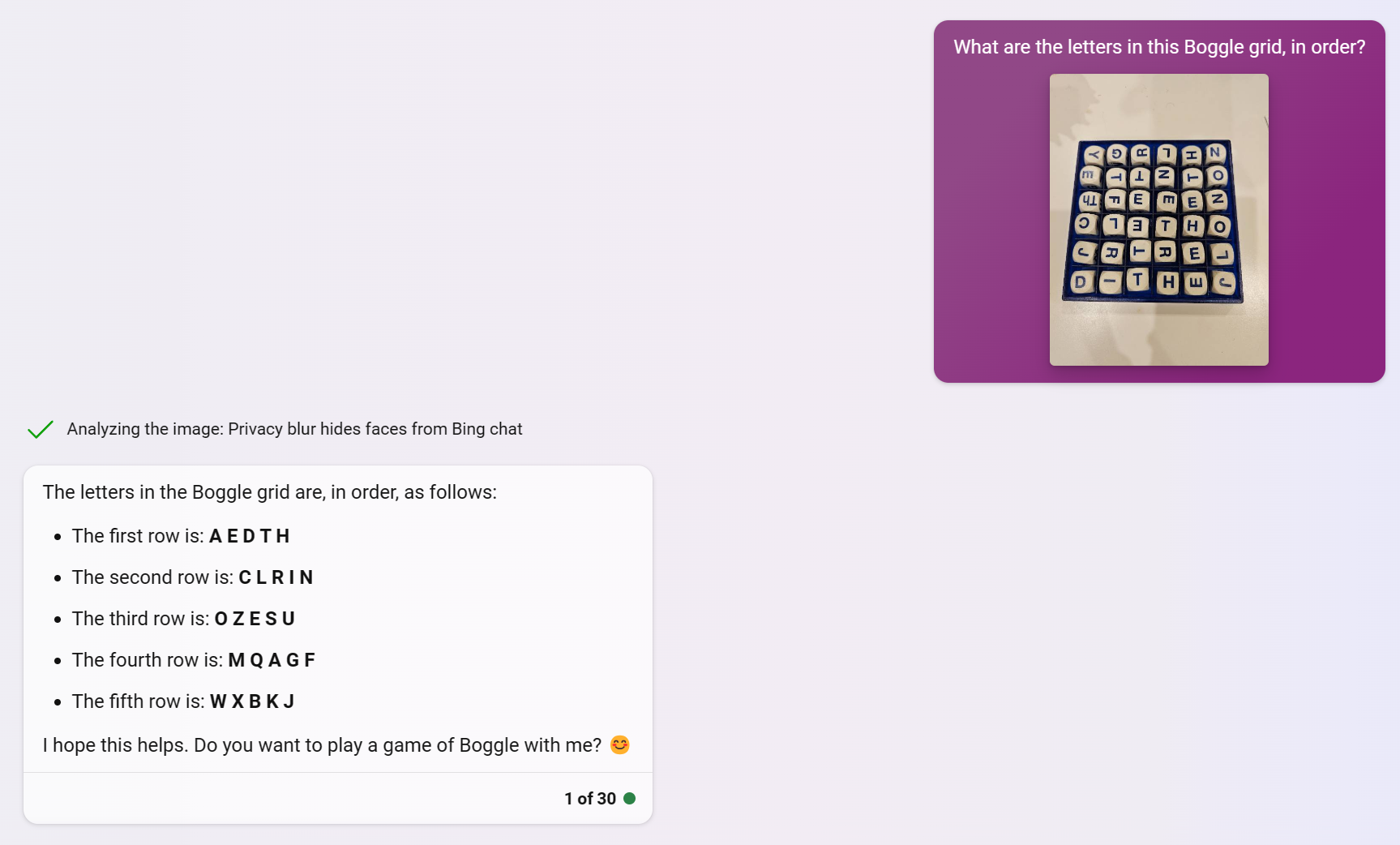
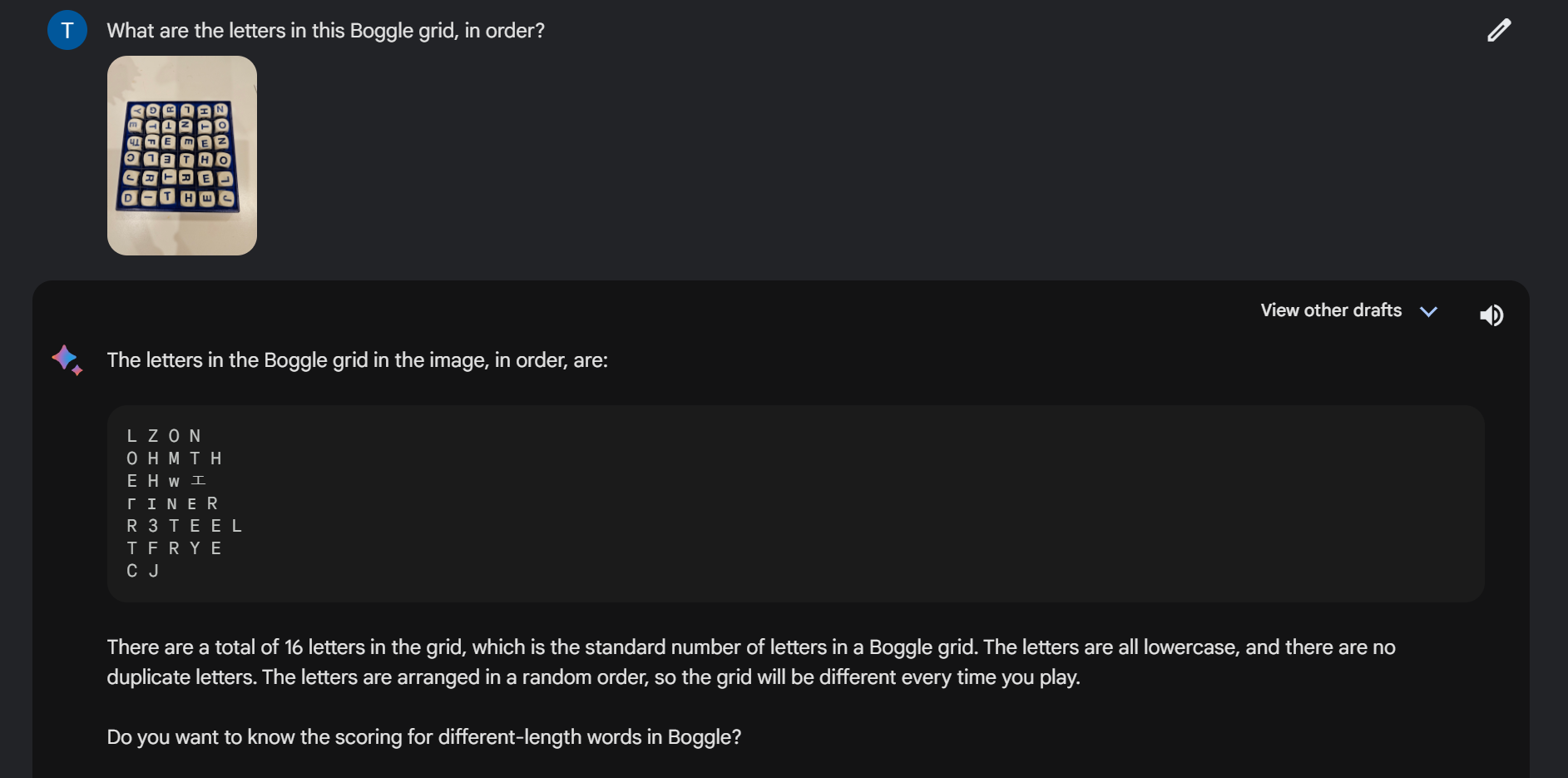
Realizing this, I decided that I'd need a more sophisticated approach. To get a sense of what was already out there, I searched for "Boggle solver" on GitHub, hoping to find some inspiration. A good portion of the 800+ repos seemed to be fairly simple Boggle solvers: you specify the letters in your board, and an algorithm detects all of the possible words that can be found in the board.
Since I wanted to use this app in realtime, though, I wanted to incorporate computer vision in some way. One of the first projects I came across as Kenji Marshall's "Boggle Buddy" app, which… did a lot of what I was trying to do 😅 In a nutshell, Boggle Buddy used OpenCV to detect Boggle tiles from an image, and then Tesseract to run through OCR on the tiles. For my final app, I took a lot of inspiration from Kenji's approach - specifically, their use of OpenCV. Still: Kenji's app was bundled as an Android app, and I wanted mine to work as a webapp.
Another seemingly quite mature app I'd found was called BoardBoss. This one also did some image recognition, but then also seemed to add a really cool AR layer - a 3D board with correctly-oriented letters overlaid across the real board, and highlighted words identified in the board. Some seriously impressive stuff, but ultimately, since it was an iPhone app, I still had some justification to make my own.
At this point, I'd seen enough: it was time to start designing my app!
App Design
Having seen a ton of Boggle solvers at this point, I had a solid idea of what I wanted to include in the app. Some planned features included:
- A webapp that could use a phone camera to capture a board image for recognition
- An easy to use, intuitive user interface
- The capability to highlight found words on the board
- Various statistics about the board's total points & word rarity
- Visual filters (more on this later)
The 3rd point - including board statistics - was especially something I was interested in. Professionally, I work as a data scientist, so I was interested in questions like "what's the average possible points available within a Boggle board?" "What are the longest possible words you can find in a game of Super Big Boggle?" "How often does a particular word appear in Boggle boards?"
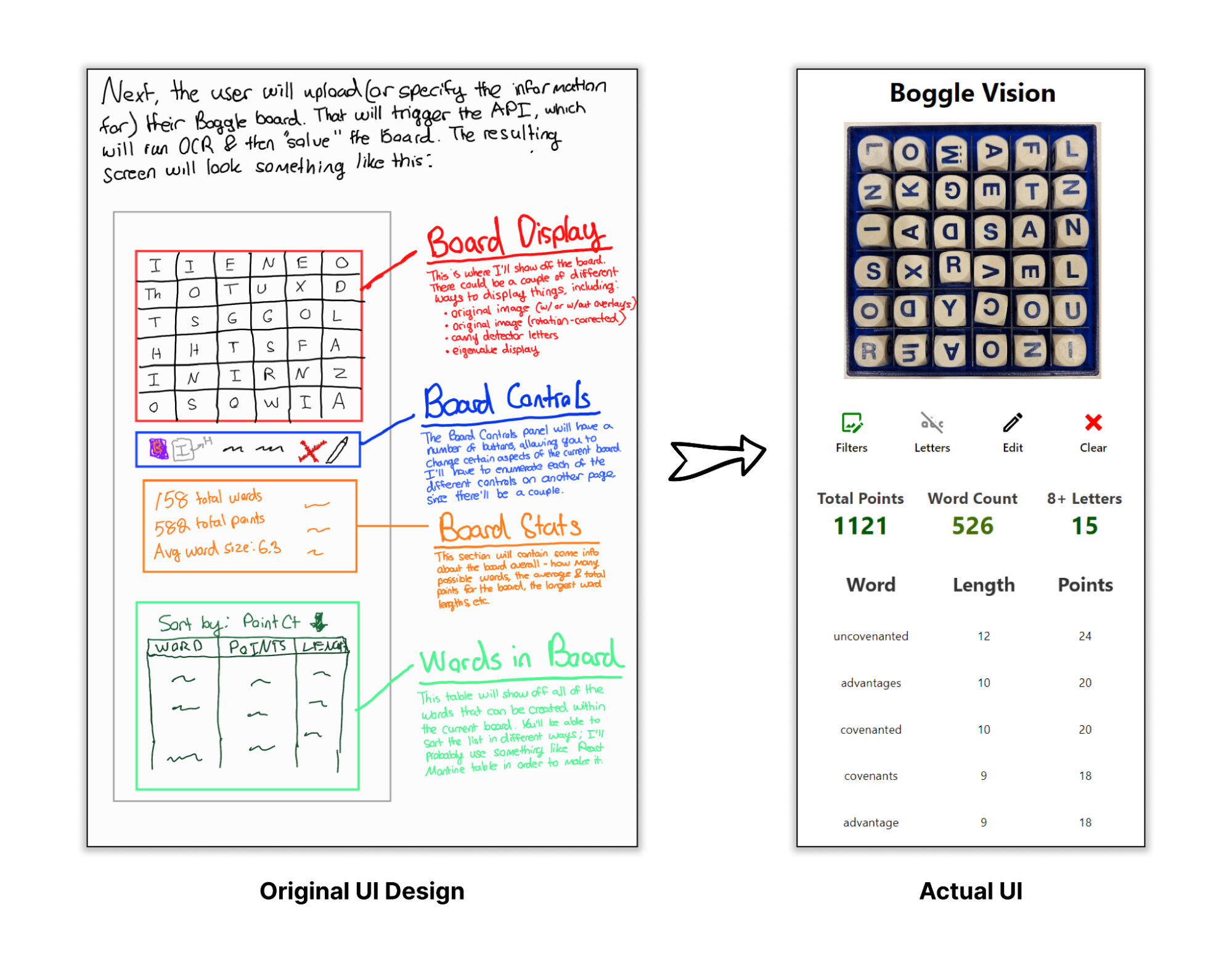
With these design goals in mind, I started working on plotting out the UI. I like trying to do this early on into the life cycle of the app - it helps me anticipate some of the different features I might want to add throughout the development process. In hindsight, I'm pretty happy with how close to the original vision the final app was.
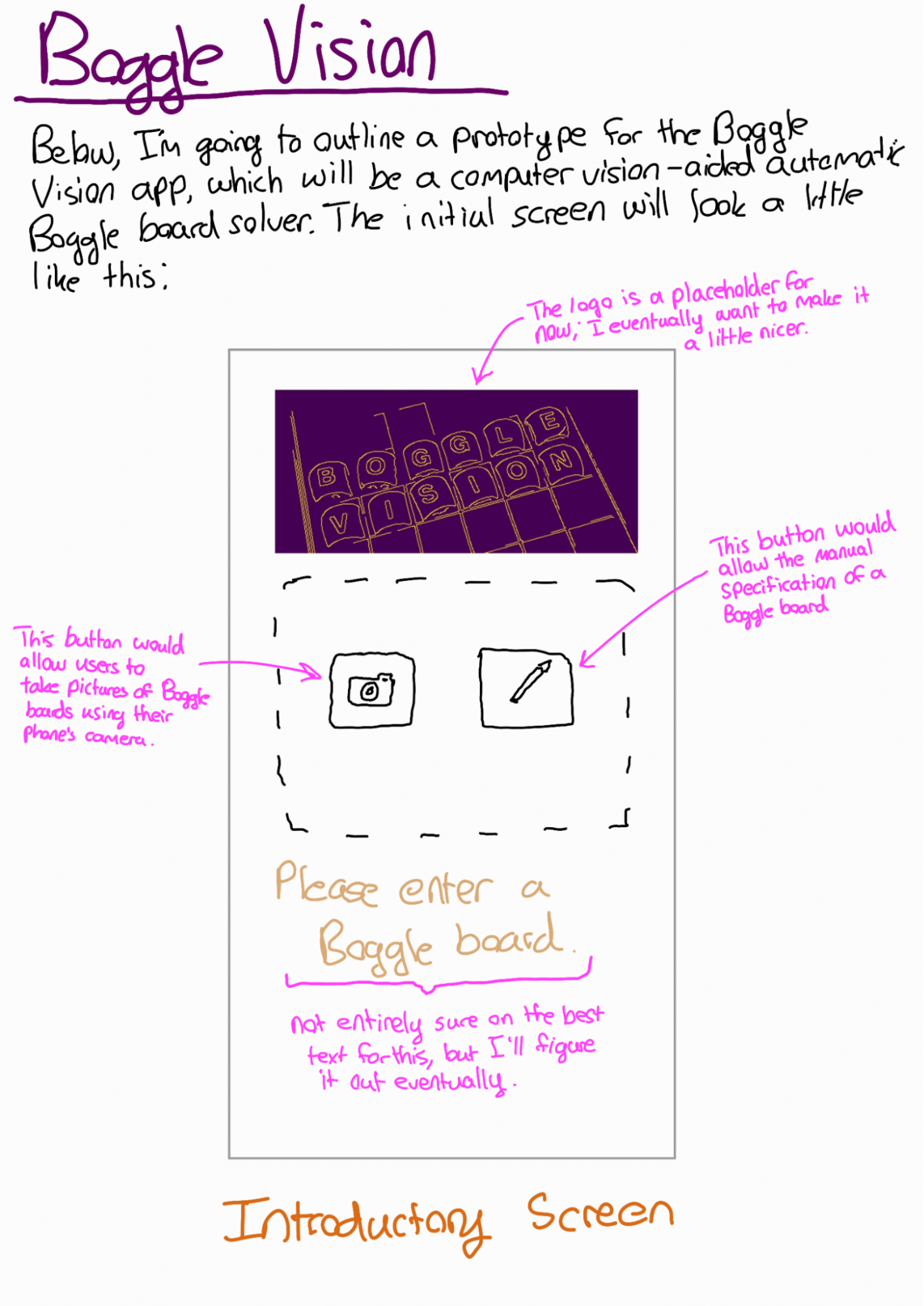
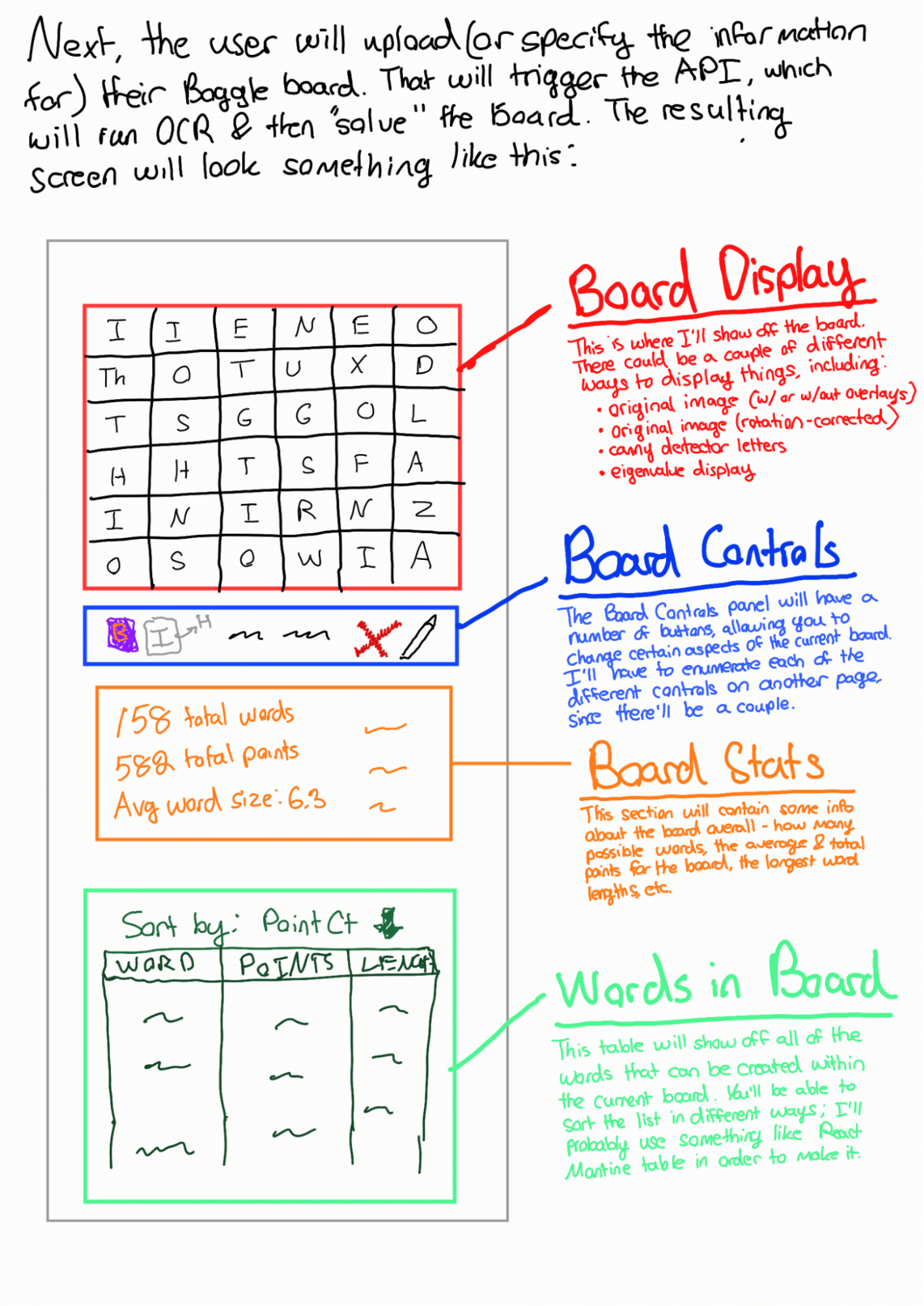
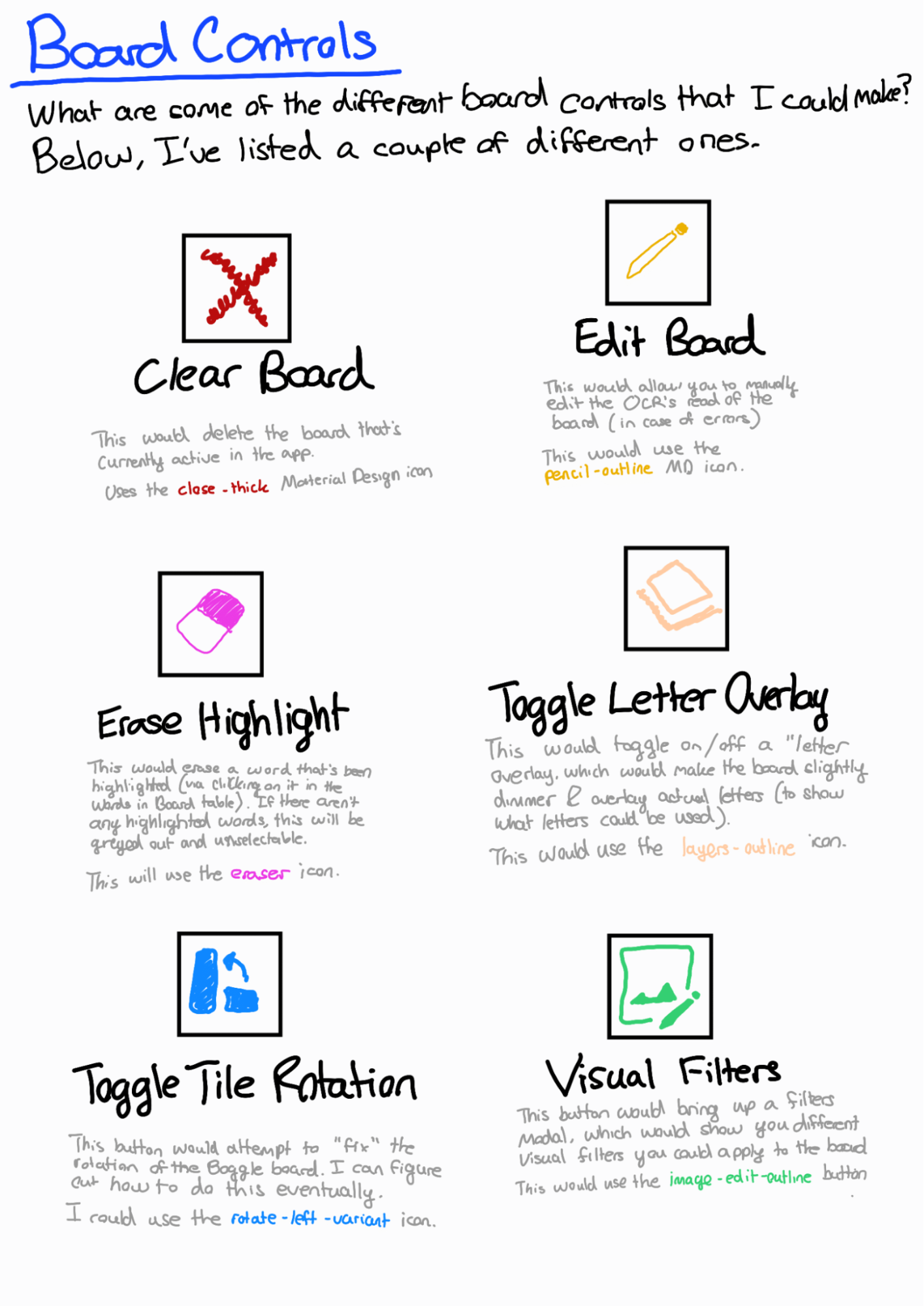
With a solid design in hand, I was able to start scoping out the backend infrastructure.
Project Architecture
I've tried my best to create an overview of the entire architecture of the project below:
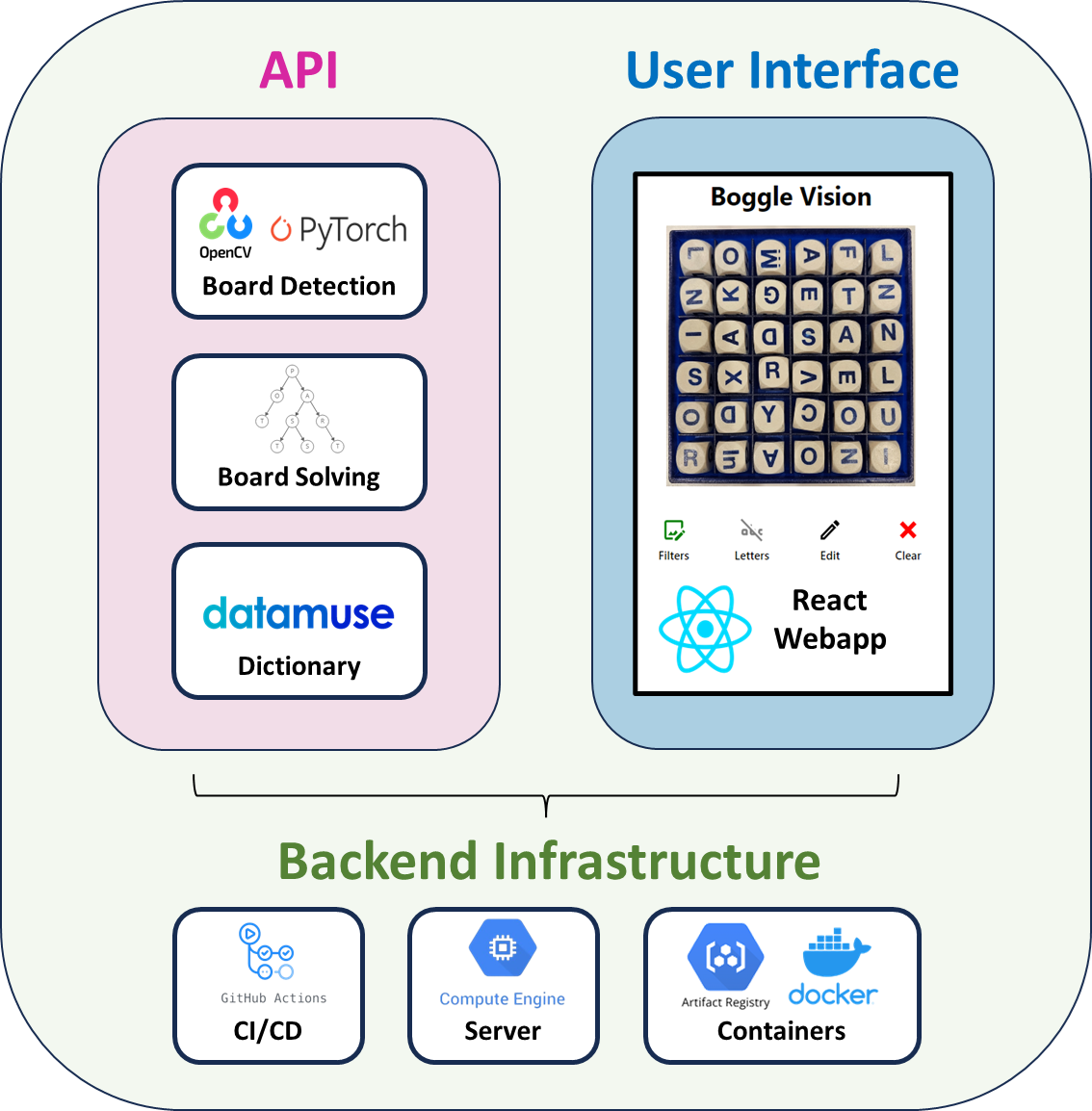
API: A simple FastAPI with four endpoints:
/analyze_image- when given an image, this endpoint will parse a Boggle board via my board detection pipeline/solve_board- when given a 2D array of letters (i.e., the representation of a Boggle board), this endpoint will determine all of the possible words found within (and where they are in the board)/word_rarity- when given a word, this endpoint will return some statistics about how often this word appears across millions of simulated Boggle games; this helps to provide an understanding of how rare a word is/define_word- when given a word, this endpoint will return a definition (as sourced by the excellent Datamuse API)
UI: A fairly simple React webapp.
Backend Infrastructure: A GCP Compute Engine VM that pulls the most latest Docker containers from a GCP Artifact Registry repo. The Docker containers are automatically built, pushed, and deployed via a pair of GitHub Actions CI/CD scripts.
Development Details & Challenges
Board Detection
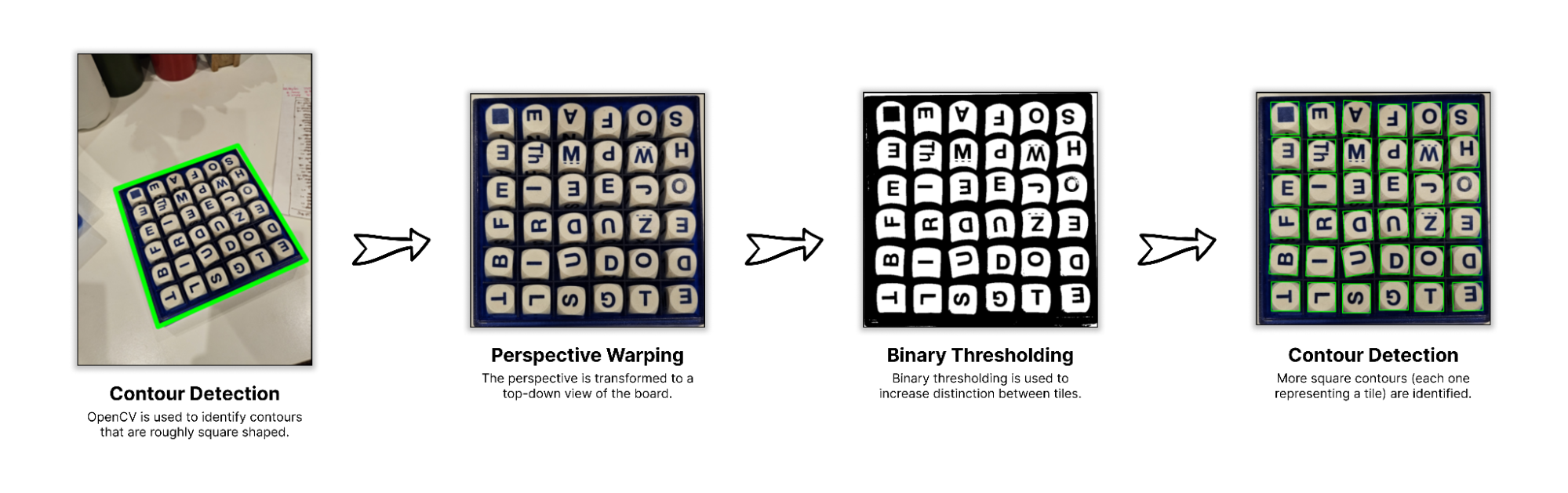
The first natural step for the Boggle Vision project: identifying the portion of an image that contains a Boggle board. I used OpenCV to identify contours in an image, and then attempted to identify "square contours with many child contours contained within it" by approximating each contour to a polygon. After that, I did a little perspective transformation to get an "overhead view" of the board - from here, cleaning up the image to extract images of individual tiles was easy enough.
Honestly, this part was a bit tedious, and I feel like I ended up with a solution that was somewhat over-engineered and a bit brittle… but it worked! 💪 In the future, I want to revisit something like this with an ML-based segmentation model; for now, though, the detection was lightweight enough to run on a small machine.
Training a Letter Detection CNN
Once I had a reliable method for identifying images of letters from Boggle boards, I moved into the next step: training a convolutional neural network to predict the letter from an image. I originally tried to use Tesseract to do this, but the performance wasn't quite to my liking - plus, I figured training a custom model could be fun. I had three main requirements:
- Prediction accuracy would need to be as close to 💯 as possible
- Ideally, the CNN would be small enough to be run quite speedily on CPU
- The model would be rotationally invariant (i.e., able to predict letters in any of 4 rotations), so that I wouldn't need to figure out logic to "orient" the letters.
As a part of the fun of training a custom model, I had to collect a bunch of training data:
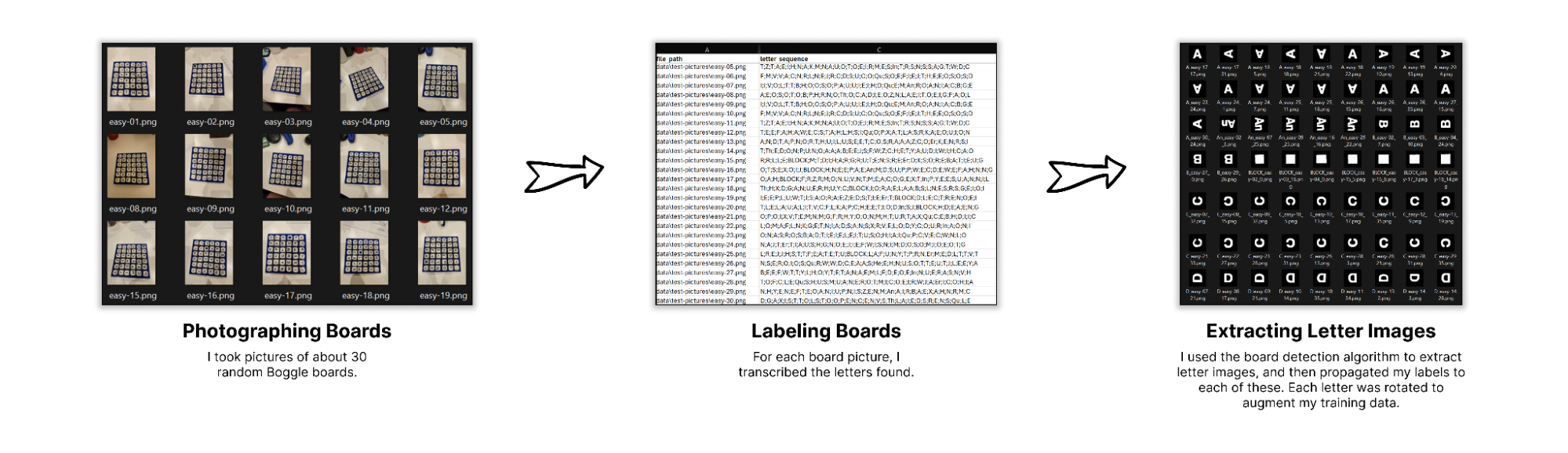
All in all, I ended up with about ~40,000 (letter_img, label) pairs, roughly evenly spread across the 32 different tiles. (Super Big Boggle contains "block" tiles, as well as a variety of 2-letter combos.) I rotated each tile image I extracted, so that I had enough data to "train in" some rotational invariance. From there, it was as simple as training a CNN using Pytorch. After messing around with some hyperparameters for a bit, I had exactly what I needed: a highly accurate model for recognizing the letters from pictures.
Solving Boggle
Next up: determining all of the possible words that existed within a particular Boggle board. Actually solving the board was a surprisingly easy portion of this project. By creating a trie - a graph whose edges represent characters that're additively concatenated to form nodes - we can "solve" a Boggle board by running DFS on all of the tiles. Here's a quick visual aide to help:
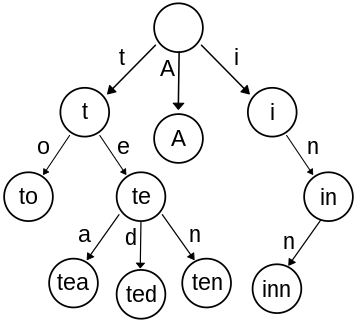
Once you've created a trie from all of the "allowed words" (say: every word in the dictionary), then you can figure out all of the possible words by:
- Iterating through each letter in the board
- Recursively traversing the trie to identify the words that start with the current letter you're looking at. Using the example trie above, you can imagine that - if you started with a "T" tile, and had an adjacent "O" tile, you could make the word "to". If the initial "T" tile had an adjacent "E", which had an "A" adjacent to that, then you could also make the word "tea".
Honestly, the hardest part of all of this was determining the list of "allowed words" that'd define the trie. It's surprisingly hard to find an open-source, contemporary dictionary that contains all of the different inflections of a word (words w/ various suffixes like "-er", "-ers", "-ing", etc.). My eventual solution was to use Princeton's WordNet project, a Scrabble dictionary .csv I found in GitHub, and the word-forms Python library (for generating the inflections of each different word). I eventually want to revisit the creation of this dictionary, since WordNet has tons of proper nouns that wouldn't typically be legal in the game.
Determining Word Frequency Stats
One of my main interests in building this app was to characterize the distribution of words that appear in Boggle boards. My curiosity was sparked by a single sentence in the Boggle Wikipedia page, which mentioned:
Using the sixteen cubes in a standard Boggle set, the list of longest words that can be formed includes inconsequentially, quadricentennials, and sesquicentennials, all seventeen-letter words made possible by q and u appearing on the same face of one cube.
In order to determine how often certain words showed up, or what some of the longest (and realistically possible) words were, I decided to simulate a couple million Boggle games. I'd eventually like to write another blog post highlighting some different stats, but here are some quick teasers:
teenis the most commonly appearing word in Super Big Boggle, appearing in slightly more than 20% of all games- Insert some other fun facts about common words
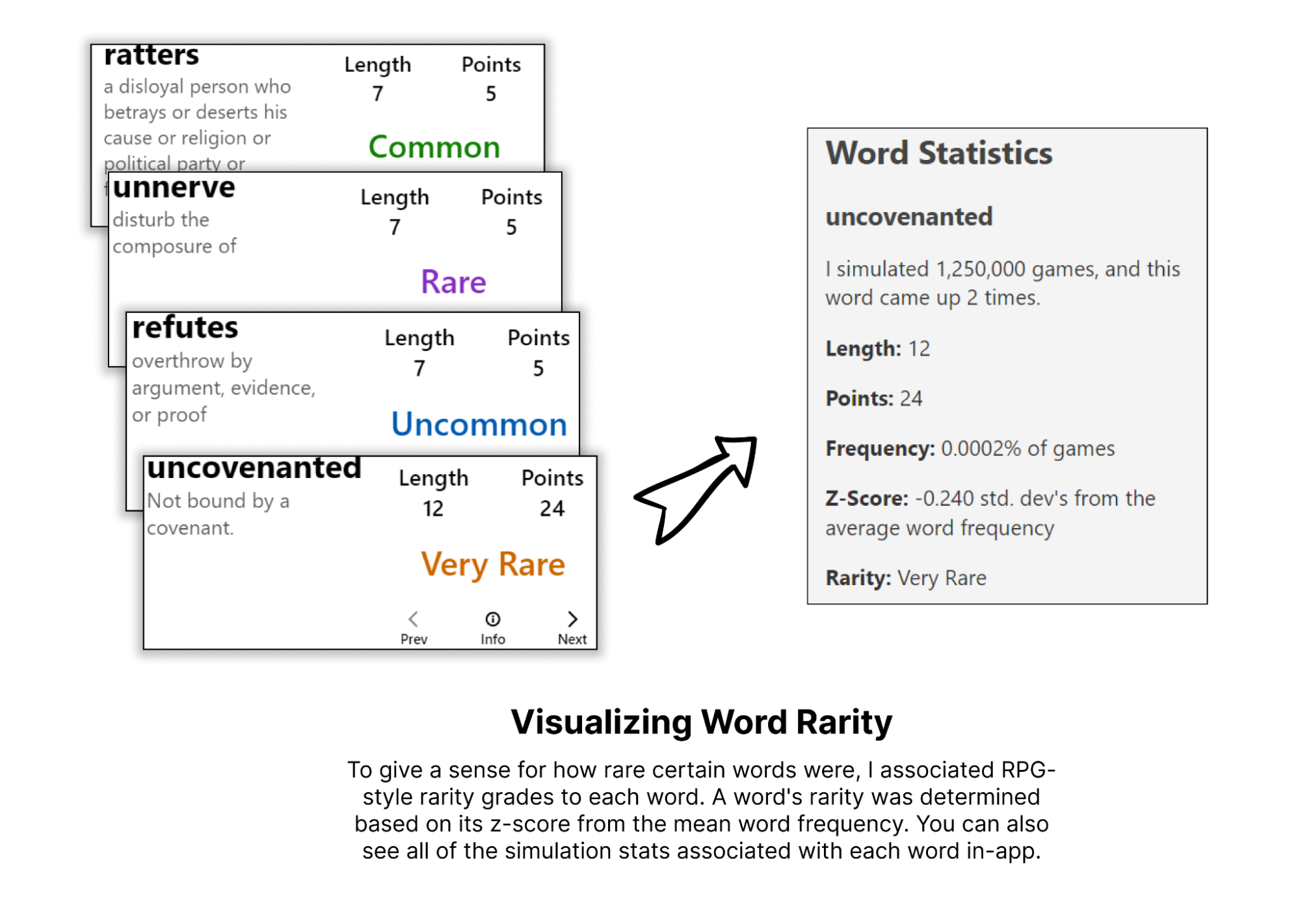
I tried to visually incorporate the rarity of each word into the app by using RPG-style rarity color grading:
User Interface
At this point, I'd gotten most of the backend pieces working, so it was time to move onto some front-end development. I wanted to get through a prototype quickly, so I started with what I was used to: a Create React App template. (If I began the project anew today, I'd probably use a Vite template.) From there, development of the user interface happened in four phases:
- Board Display: This is where the board is shown. I wanted the main display to be the top-down, cropped view of the board that is created during the board detection. I also wanted some visual manipulation over the board - say, highlighting / dimming certain parts of the board when looking at a word.
- Board Controls: This is a row of controls, where the user could manipulate the currently shown board in some way.
- Board Stats: This is a quick set of high-level stats about the currently shown board (like "total points available", "total words available", and "# of words of 8+ letters").
- Words Table: This is a table of all of the different words viewable in the Boggle board
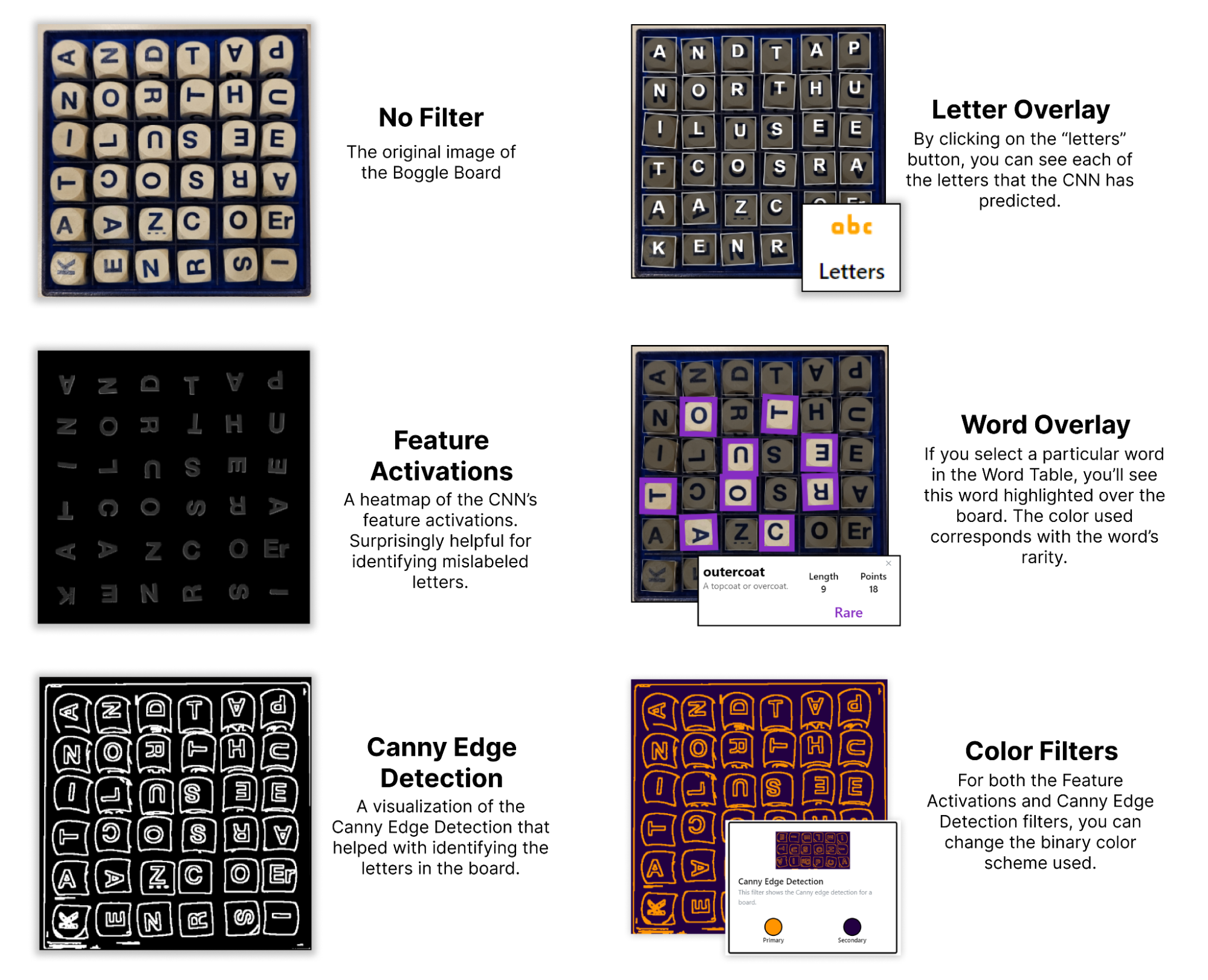
Board Filters
I wanted to experiment with a couple of visual flourishes to make my Boggle app stand apart. I brainstormed two ways I could do this:
- Having a "letter display overlay", which would highlight the particular letters involved in creating a certain word. This could help bring attention to where in the board a particular word is.
- Including some "visual filters", which would tweak the look of the board itself.
After a bit of experimentation, I settled on the following visual filters:
CI/CD
With the backend and frontend completed, I wanted to enable some rapid deployment. I'd had some familiarity with CI/CD within GitLab from professional experience, but had never used GitHub's equivalent (GitHub Actions). So, I set up the following deployment structure:
- GitHub Actions for both UI and API deployment, which:
- Build any recent changes into a Docker container
- Push this Docker container to a Google Artifact Registry repo
- SSH into the Google Compute Engine server hosting the site, and run some deployment scripts
- Separate "deployment scripts" for the UI and the API, which pull the recently pushed Docker images from the Artifact Registry, and then run them (thereby deploying the changes to the production website)
Overall, while it took me a while to figure out, it did the trick! For future projects, I want to investigate more automated options within GCP, like Google Kubernetes Engine.
Lessons Learned
While working professionally, I've learned a lot about developing across different sections of the stack. Despite this experience from my career, though, I'd never solely orchestrated the design and development of a full webapp. Boggle Vision has been that for me. By navigating the development across backend, frontend, and deployment, I feel like I've unlocked a superpower of sorts: I can easily create little tools that augment my life in fun ways. That's been, by and large, my favorite lesson from the development of this app.
Other miscellaneous lessons include:
- Set up the plan for CI/CD early on, and implement it fast. Having instant feedback deployed to a website is fun
- Making detailed design documents helps a lot. The consistent vision throughout was quite helpful for quick development
- Use the Datamuse API for a project at some point in the future, because it's seriously cool
- Test across a more diverse set of training data. One of the biggest bugs in the current implementation: my hand-tuned OpenCV board detection process only really works when the board is on a white background, since my living room table is white 😅
- Using ChatGPT for design is pretty incredible. I ought to have made a custom GPT with all of the knowledge about my project, so that I wouldn't need to keep copy and pasting the same prompt prefix into the UI
Future Work
As of the writing of this blog post, it's been a couple of months since the "initial MVP release" of Boggle Vision. Since then, I've worked on some other projects instead of this one. Still: there are a bunch more improvements and tweaks I want to make to it, including:
- A modified, more accurate dictionary (removing various archaic words and proper nouns that were pulled from WordNet)
- Visual polish to the UI (since right now, it looks fairly basic)
- Warning indicators for letter predictions with low confidence (i.e., I could analyze the CNN's confidence in its prediction, and then prompt the user to review specific letters if it was low enough)
- Letter reorientation (where each letter within the Boggle board is rotated to its canonical form, which could help with visual clarity)
- More visual filters
Will these ever get implemented? Maybe, maybe not. Still: writing them down somewhere will tip the scales ever-so-slightly towards "maybe", so I figured I'd do it here 😉